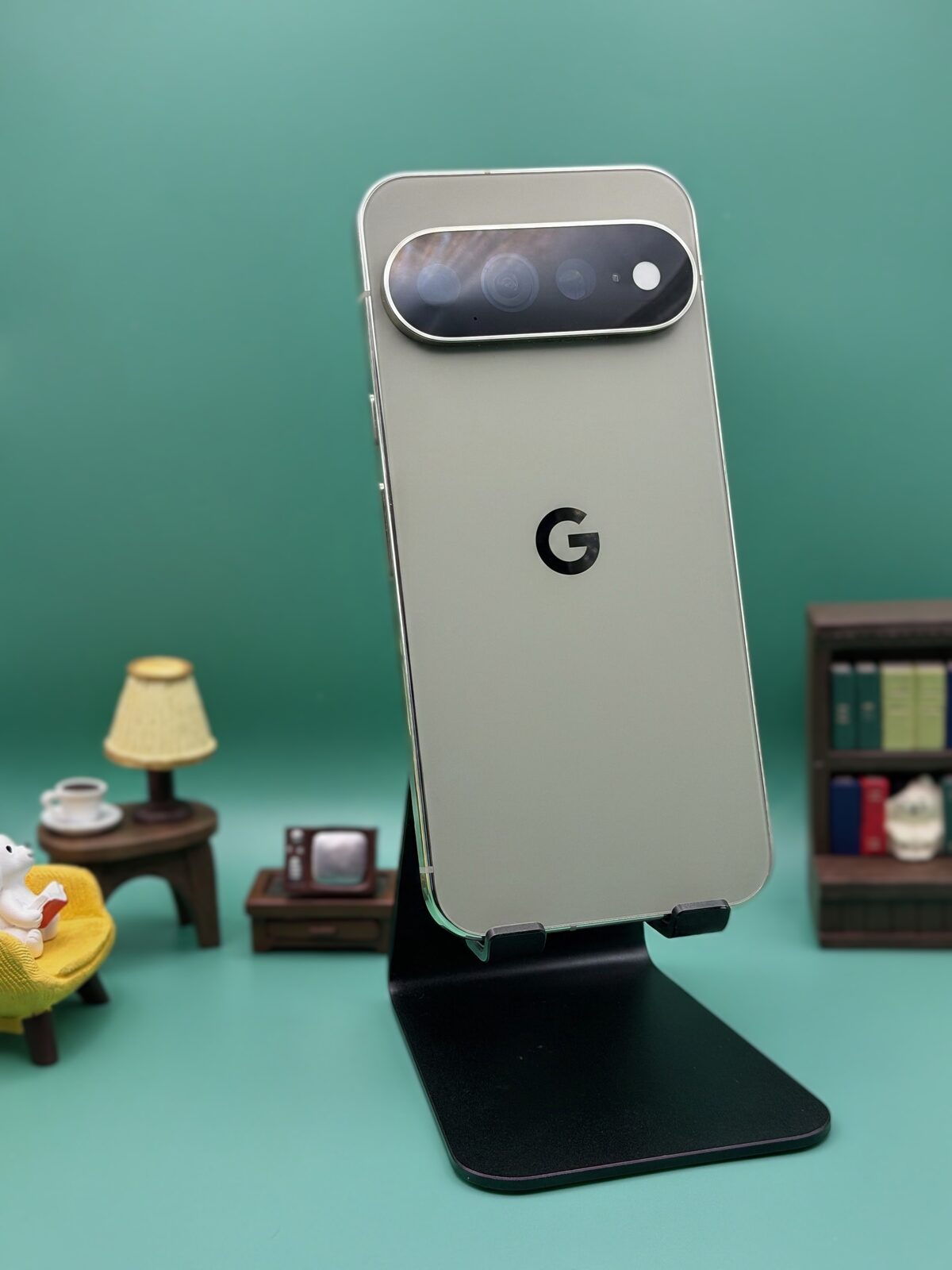
I have been buying phones since they got interesting in the early 2000s. I was in high school then and I have not stopped since.
Pixel always had my attention, back when it was still called Nexus, because of the software. Nobody else shipped Android the way Google actually intended it. The Pixel 6 is when it really clicked for me, the rebrand, the first Tensor chip, the whole reset. I have tested every Pixel since.
So understand where this is coming from when I say it. The Pixel 11 Pro XL has the best software experience on Android, and I still did not trust it enough to leave the house without a backup phone in my bag.
The moment I stopped defending it
Two weeks in, I had a work training 90 minutes away. Somewhere I had never driven to.
I put the Pixel down and took my iPhone.
Not because the iPhone is a better phone. Because I could not be confident the Pixel would hold a data connection for 90 minutes on a highway, and losing navigation halfway to a place I did not know was not a gamble I felt like taking on a Tuesday morning.
That is the review. Everything below is the evidence.
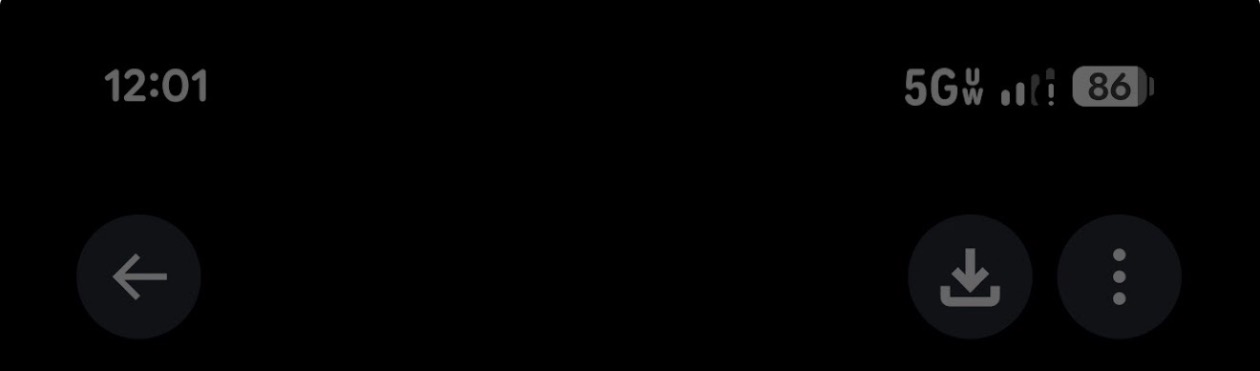
Look at what that status bar is claiming, because the three things on it contradict each other. 5G UW is Verizon's fastest tier. The bars are filled, so the radio is registered to a tower with real signal. Battery is at 86 percent, so this is not power saving strangling the modem. And then there is the exclamation point, which is Android's way of saying it ran its own connectivity check and could not reach the internet.
A phone in a dead zone shows no bars and drops to LTE. Nobody blames the handset for that. This is the opposite. My phone believed it was sitting on the best network Verizon sells, and nothing was moving.
It happened at work. It happened while driving. It happened on Android Auto, where music would just quietly stop loading, and there were mornings I pulled out of the driveway in silence because the data connection had given up somewhere between the house and the road.
Google had one job this year
For five straight generations Google shipped Samsung Exynos modems and took the blame for them every single year. For the Pixel 11 they finally switched to a MediaTek M90. This was the fix. This was the whole point.
It did not work for everyone. Android Authority polled their readers after launch. Fifty one percent reported no problems at all. The other forty nine percent reported something, 21 percent on mobile network, 11 percent on Wi-Fi, 4 percent on Bluetooth, 13 percent hitting more than one. Owners on Reddit described my exact symptom, exclamation point on the data icon, reconnect a few minutes later, repeat forever (Source). Android Central said it flatly in their review, no improvement in cell coverage despite the modem change (Source).
I want to be fair here, because the counter-evidence is real. Android Authority's own lab testing found the Pixel 11 Pro held signal better and pulled faster data than the Pixel 10 Pro. So this is not a simple story about a worse radio. It looks more like a firmware or provisioning problem hitting a slice of devices than a design failure.
That distinction matters a great deal to Google. It matters not at all to me. If you land in the wrong half, you own a phone you cannot plan around.
Then it fixed itself, which is somehow worse
Build CD1A.260905.001.A1. Under 100MB. It showed up out of cycle, ahead of the Android 17 QPR1 release everyone was waiting on (Source). Since I installed it, no drops, no reboots, nothing. The phone has been responsive and reliable, which is what it should have been on day one.
So Google fixed it. Good. Except Google's entire changelog reads, in full, "This update fixes critical bugs and improves the performance and stability of your device." Verizon's note was no better. Nobody at Google has said, anywhere a customer can find it, what was broken. Or that anything was broken at all.
And then it gets strange.
Google will admit it, just not where you can see it
On August 31st a Canadian tech creator named Zak, @ZAKtalksTECH, posted about his own Pixel 11 Pro. Total cell dropouts, Wi-Fi drops, NFC glitches. He checked with his carrier first and the carrier came back clean. Then he called Google support and posted the call summary. Read what Google told him:
The device has been experiencing the issues for 9 to 10 days. The device was confirmed to be defective. A replacement device was requested. An advanced replacement option was chosen. The replacement device is expected to arrive within 0 to 3 business days.
Confirmed defective. Advance replacement shipped before he even sent the old one back, prepaid labels, extra coverage transferred over. His own read on it was "annoying, but smooth customer service," and honestly that is fair. Google handled him well.
I replied to that thread saying I had the same problem and posted my screenshot. Google's own account, @madebygoogle, replied to me publicly that night, 9:35 PM on August 31st, asking me to DM them so they could help. I did. As of 2pm Eastern on September 8th, eight days later, nobody has followed up.
So line up everything Google has actually done here. They told one customer, on a recorded support call, that his Pixel 11 Pro was confirmed defective hardware, and replaced it. They publicly offered to help me, took my information, and went quiet. They shipped an out of cycle software update that fixed my phone completely. And they said nothing, anywhere, to anyone not already on the phone with a support rep.
The first and third of those cannot both be the whole story. If this is defective hardware, why did a software patch fix mine? If it is software, why was Zak's unit swapped out as defective? Google is handing different customers different answers, one at a time, in private, and publishing none of it.
What bothers me is not the bug. Bugs happen. A fix in under three weeks is genuinely fast, and Zak's replacement went out in three days. At the individual level, Google's support is doing its job well.
What bothers me is that none of it is findable. If you bought a Pixel 11 last week and it keeps dropping data, there is no support page, no known issues list, no "we are aware, a fix is rolling out." You either happen to call support, or you happen to scroll past a thread on X, or you sit there quietly assuming your carrier is bad and your new thousand dollar phone is just like this now.
Google has admitted problems before when the pressure got high enough. They publicly conceded the bootloop issue this year and promised a fix. They publicly credited the July and September updates for battery drain fixes. So the silence here is a choice, not a policy.
Thanks to @ZAKtalksTECH for posting that call summary. Without it I would have assumed my unit was fine and the update was routine.
The other thing that kept happening
Three times in my first week, the phone died on me. I would press the side button to ask Gemini something and the screen would go black. Every time my first thought was that I had frozen it. Holding the side button for a few seconds brought it back like a cold boot.
I have not seen anyone else pin this specifically to the Gemini side button, so take it as what it is, my own observation, three times, week one, uncorroborated.
The category is corroborated though. Android Authority documented Pixel 11 Pro units powering off every few seconds during initial setup, unusable straight out of the box. One owner got an overheating warning in a 64 degree room (Source). Google never made a statement. They just quietly started swapping devices. You do not replace hardware for a problem you think is nothing.
Tensor is still the ceiling
My complaint about Pixels for years has been heat. East coast summer, recording video, and the phone crawls or flat out asks me to let it cool down. Notebookcheck benchmarked the Tensor G6 GPU at three ambient temperatures and the numbers are worse than I expected. At freezer temperatures it scored 414,765. At 11 degrees Celsius, 226,111, a 45 percent drop. At 36.7 degrees Celsius, 40,362, which is a 90 percent collapse from peak (Source).
At room temperature it performs like a Snapdragon 8 Gen 2, a 2022 part. Warm it up and it falls to Snapdragon 888 territory, which is 2021. CPU performance held steady across all three runs, so this is the GPU specifically waving a white flag.
Android Central noted the GPU still does not support current Vulkan APIs. And Android Authority made the point that stings most, Google is charging you for a 195 gram, 7.6mm phone and did not spend that interior volume on cooling. The Galaxy S26 is 167 grams. The iPhone 17 is 177. You are carrying the bulk. You are not getting anything for it.
I ran my own numbers, and they are better than the leaks said
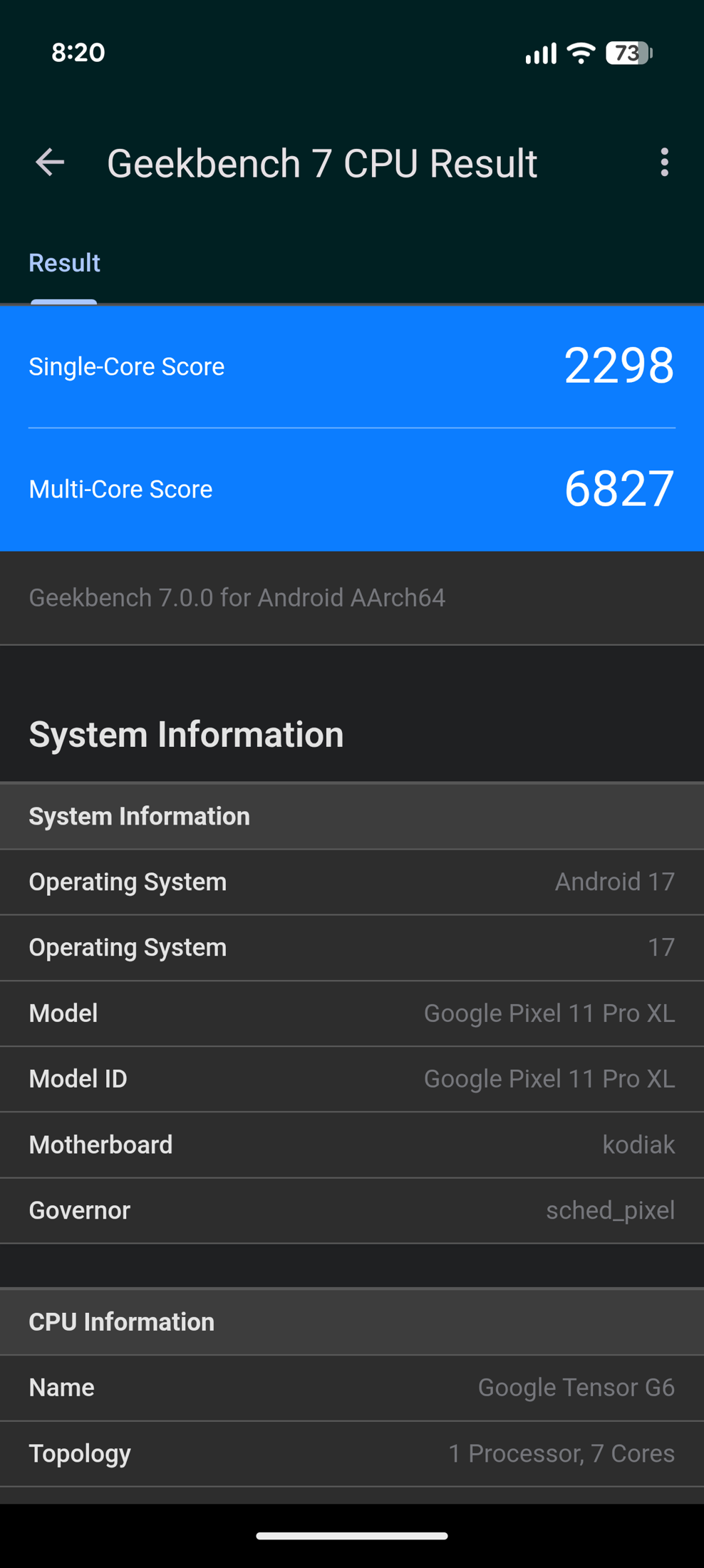
Before launch, a Pixel 11 Pro XL turned up on Geekbench 7 scoring 2,112 single core and 5,196 multi core, and the read on it was grim. The Tensor G5 in the Pixel 10 averaged 1,973 and 5,872, which meant the new chip looked like a small single core gain paired with a 12 percent multi core regression, blamed on Google dropping from eight cores to seven (Source).
My retail unit does not match that. I got 2,298 single core and 6,827 multi core, which is 8.8 percent and 31.4 percent above the pre-release run. Against the Tensor G5 it is up about 16 percent on both. So the multi core regression everyone braced for did not survive into shipping firmware. Credit where it is due, that is a real improvement and nobody wrote it up.
Now the part that is less fun. Here is the same benchmark across current flagships.
| Geekbench 7 | Single | Multi |
|---|---|---|
| Apple iPhone Air | 3,211 | 8,832 |
| Apple iPhone 17 Pro | 3,175 | 9,003 |
| Samsung Galaxy S26 Ultra | 3,142 | 10,398 |
| Honor Magic8 Pro | 3,140 | 10,953 |
| My Pixel 11 Pro XL | 2,298 | 6,827 |
My phone lands at 72 percent of the iPhone 17 Pro's single core score and 76 percent of its multi core. Against the Galaxy S26 Ultra it is 73 percent and 66 percent. Against the Honor Magic8 Pro's multi core, 62 percent (Source).
The Tensor G6 runs an unusual seven core layout, one prime core at 4.11GHz, four at 3.38GHz, and two at 2.65GHz. Google traded core count for peak clock speed. It worked well enough to beat last year, and it is still roughly a quarter to a third behind everything else in this price bracket.
Here is why that matters more than a number on a chart. Notebookcheck found CPU performance holds steady as the phone heats up. It is the GPU that collapses. So the CPU gap you see above is not a thermal problem you can work around by keeping the phone cool, it is just where the silicon is. And the GPU problem is not a silicon ceiling, it is a cooling one. Two different failures, and Google has not fixed either.
For what most people actually do on a phone, and that includes everything I do on mine, this chip is fine. Scrolling, cameras, messages, maps, all of it feels fast. You will notice it in sustained games and in long video recording sessions, which is exactly where I have been complaining about Pixels for years.
The camera is still the reason to want one
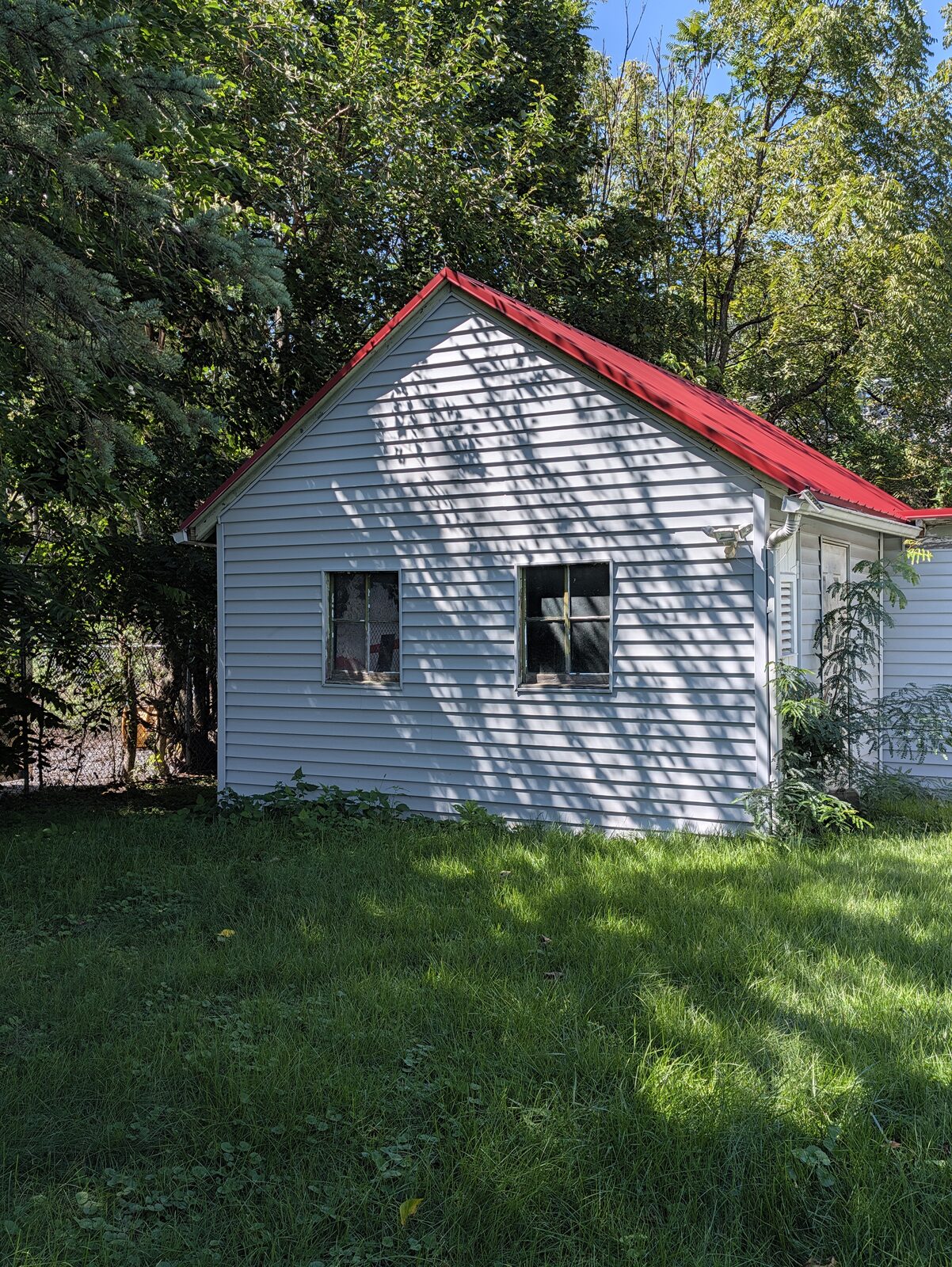
Start here, because this is the frame that proves it. Midday sun on white vinyl siding, hard dappled tree shadow thrown across that same siding, deep shade under the conifer at the left edge, a saturated red roof, open sky. Nothing clips. The white siding keeps texture in the highlights. There is still real detail in the shadows under the trees. The red roof holds gradation instead of collapsing into a flat red block.
The honest note on the same shot. The shadow lift is aggressive enough that the picture is flatter than the moment actually was. Those dappled shadows had more bite standing there than they do here. That is classic Pixel HDR. You get every stop back and you pay for it in punch.
The same shed, thirteen stops darker

I went back and shot the same building at night, which is the comparison I actually wanted. Same wall, same lens, same spot, about eleven hours apart. Most camera reviews test night mode on some unrelated street scene, so you never learn what the phone is deciding, only that it managed to make a picture.
The numbers on the two frames: the daylight shot was ISO 23 at 1/923 of a second. This one is ISO 1334 at 1/6.3. That is 58 times the sensitivity and 146 times the exposure, so roughly thirteen stops less light falling on the same wall.
What holds up is real. The siding is under a direct floodlight and still does not blow out, there is board separation in the brightest part of the wall. The red roof trim stays red instead of clipping toward orange. And the trees above the shed go yellow-green from that light, and the phone let the cast stay instead of neutralizing it into something flat and white balanced. That is the honest rendering and plenty of phones get it wrong.
Handheld at 1/6.3 of a second should be a smeared mess. It is sharp. That is the frame stacking doing exactly what it is supposed to do, and it is the most impressive thing in this picture.
What it gives up is just as visible once you know to look. The sky is pure black, no gradient, no grain, nothing, which is heavy noise reduction rather than a clean sensor. Look at the lower left, past the shadow line running diagonally through the lawn: the grass on the dark side of that boundary is noticeably mushier than on the lit side. You can watch the algorithm working harder and losing.
And put the two frames side by side. In daylight you can read the chain link fence at the left edge. At night it is essentially gone. Same scene, same camera, and the shadow detail that survived at noon does not survive here.
One caveat I want to be straight about, because it changes what this proves. There is a security light on the shed doing most of the lifting, so this is a mixed artificial light test, not a genuinely dark one. If you are asking whether this phone can shoot a dim restaurant handheld, this frame does not answer that. It answers whether Night Sight can hold highlights, color and sharpness in a lit night scene, and the answer there is yes, with flattened shadows as the price.
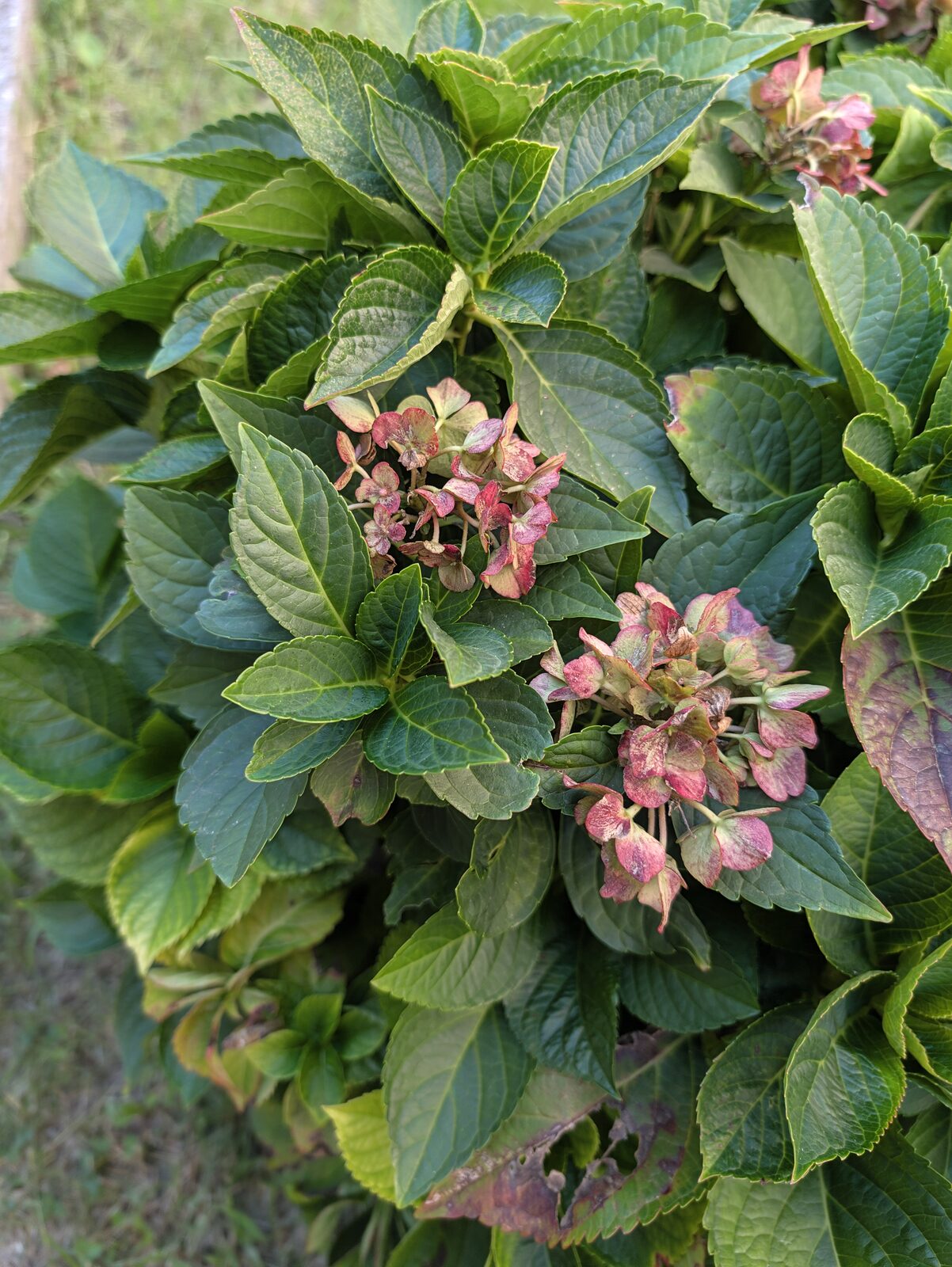
This is the hardest color problem I threw at it. Spent hydrangea blooms running through rose, mauve, dusty copper and pale green, sitting on dense waxy leaves. Cheap processing turns all of that into one flat magenta smear. Here every petal keeps its own hue and the gradient survives intact. That is real color science, not a filter.
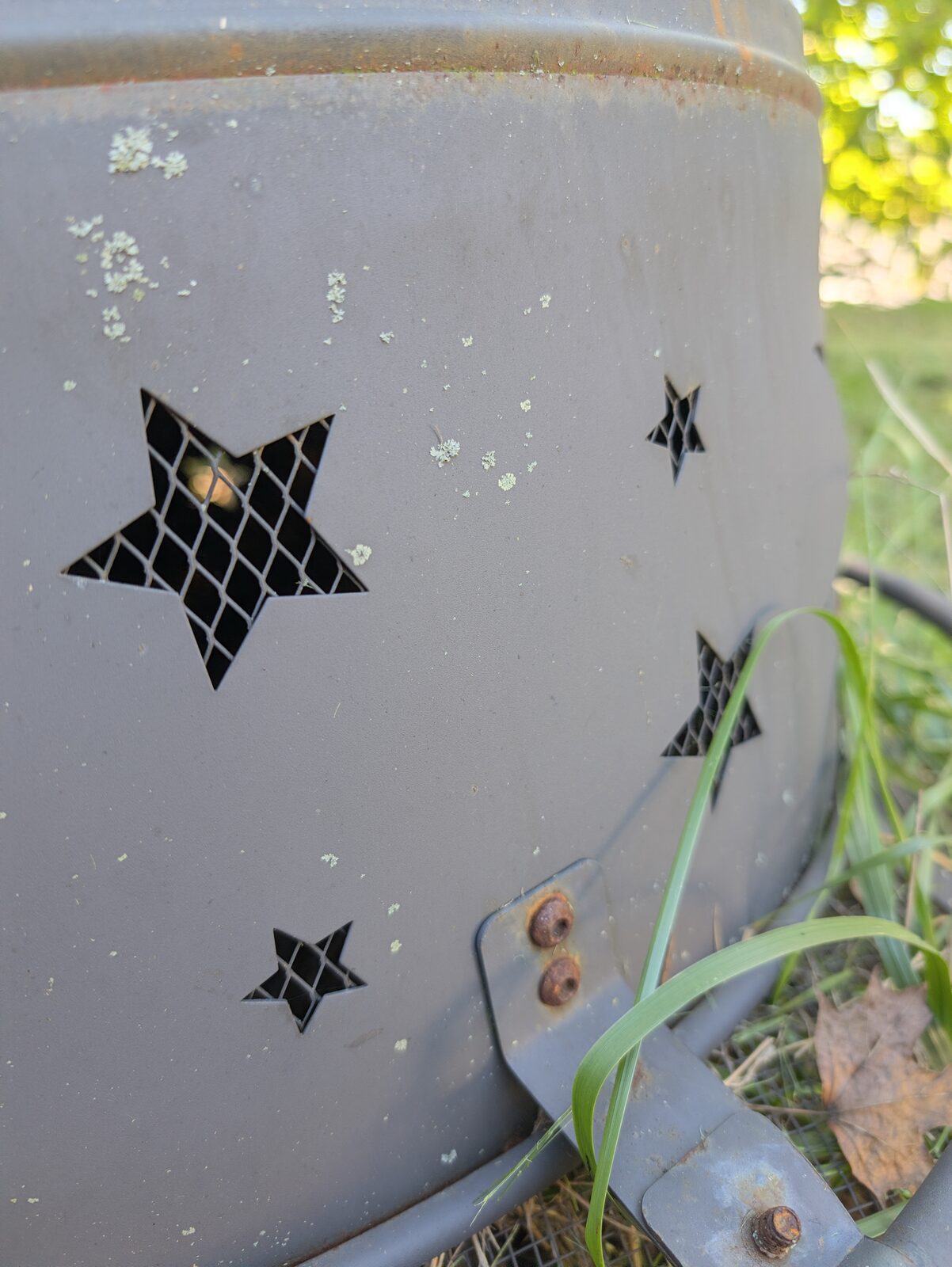
Golden hour, and the phone let warm light stay warm instead of neutralizing it into something lifeless. Look at the out of focus foliage in the corner, soft round highlights, no harsh edge outlining. That is the f/1.68 lens doing genuine optical work, not a depth map faking it.
The zoom lesson I learned from my own EXIF
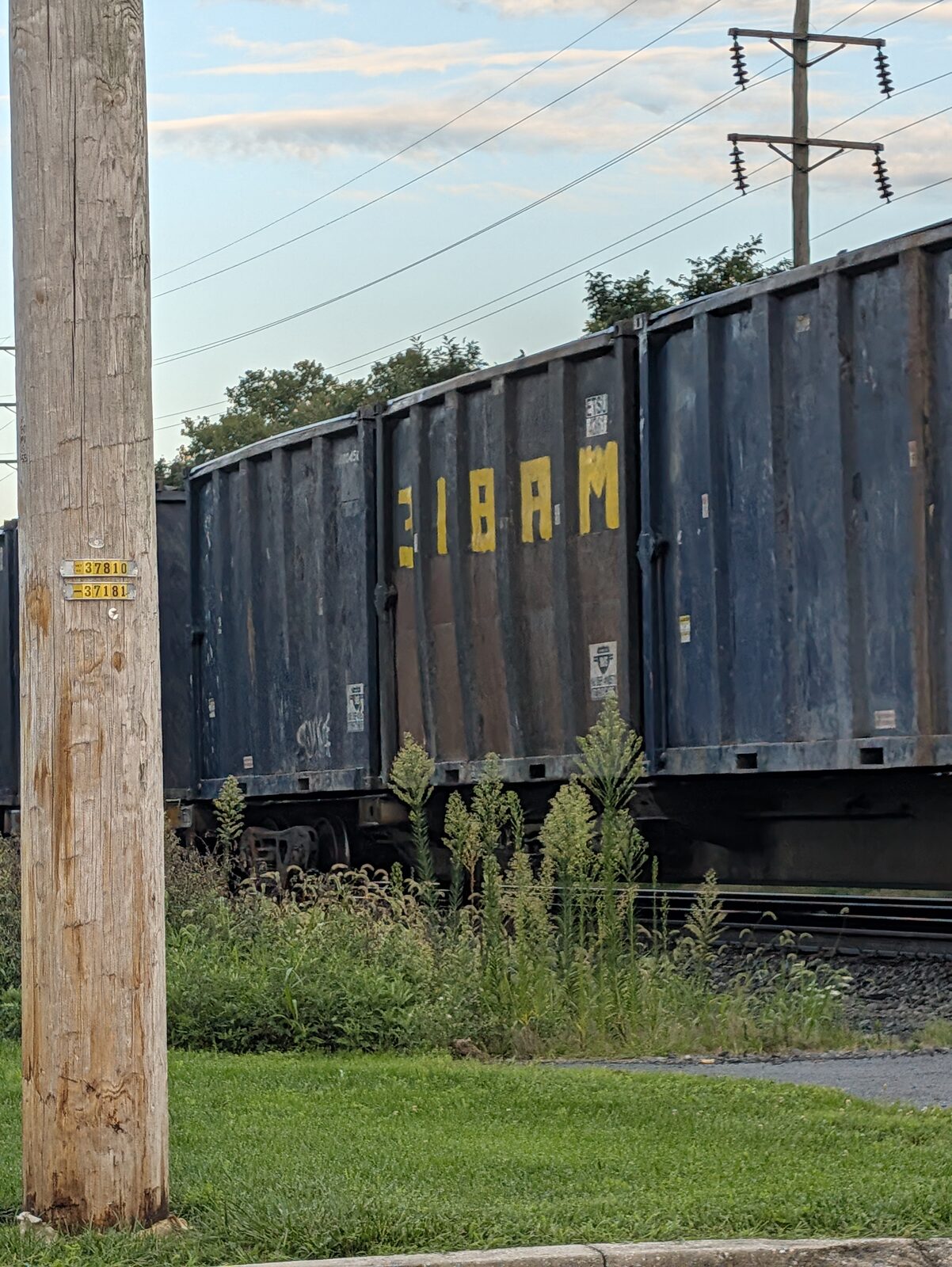
I thought this was a wide shot until I checked the file. It is the 24mm main camera at 4.29x digital zoom, so the phone cropped the 50MP sensor down to roughly 103mm equivalent framing and upscaled the result. Which turns out to be useful, because the next two frames are 105mm optical on the telephoto. Nearly the same framing, two completely different paths to get there.
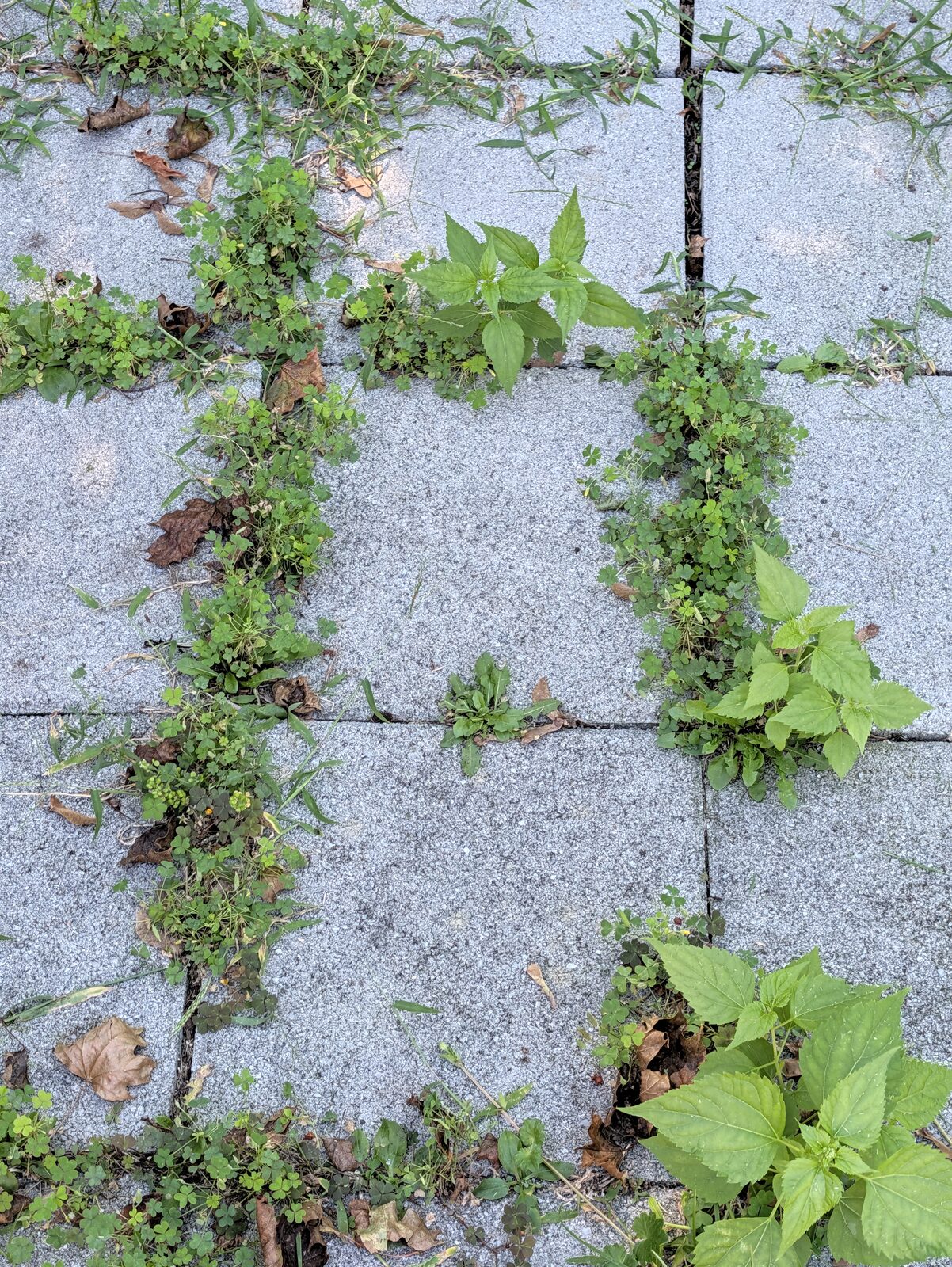
The unflattering one, and I know why now. This is the main camera at 2.45x digital zoom. Look at the concrete aggregate and you can see the cost, a faint crunch on the fine texture and slight halos where light meets dark. I originally chalked that up to heavy handed sharpening. It is not, or not only. That is what upscaling a sensor crop looks like when you push past 2x.
There is a practical lesson buried in this and it is the most useful thing in the review. Google's own spec sheet lists optical quality at 0.5x, 1x, 2x, 5x and 10x. Everything between those is the phone cropping and upscaling. My rail car shot sat at 4.29x, which is the single worst place to be, maximum digital crop right before the real telephoto takes over. If you find yourself pinching to somewhere around 4x, go the rest of the way to 5x. You will get a better file out of it.
The 5x telephoto is the real upgrade, and a bug showed me why
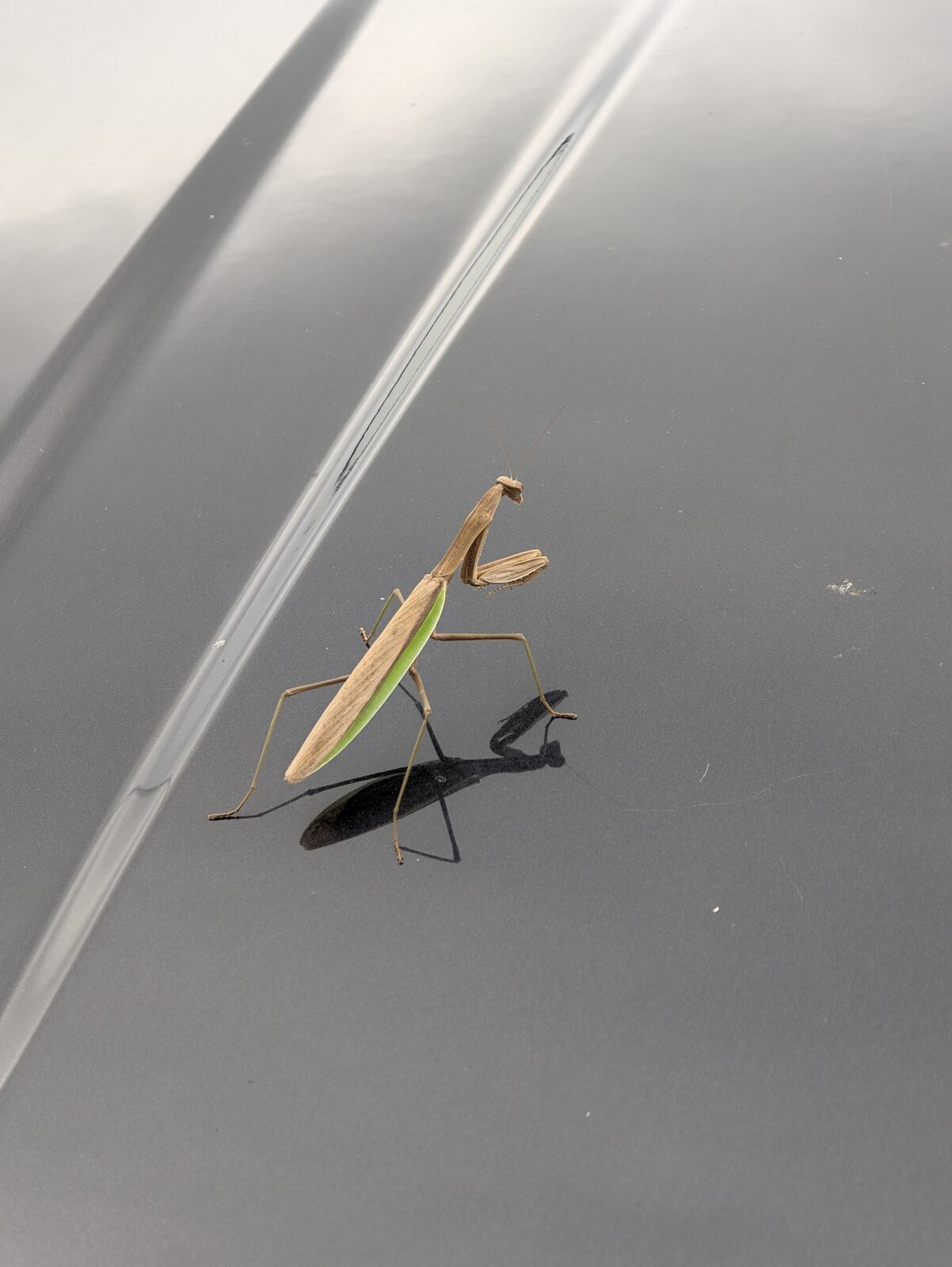
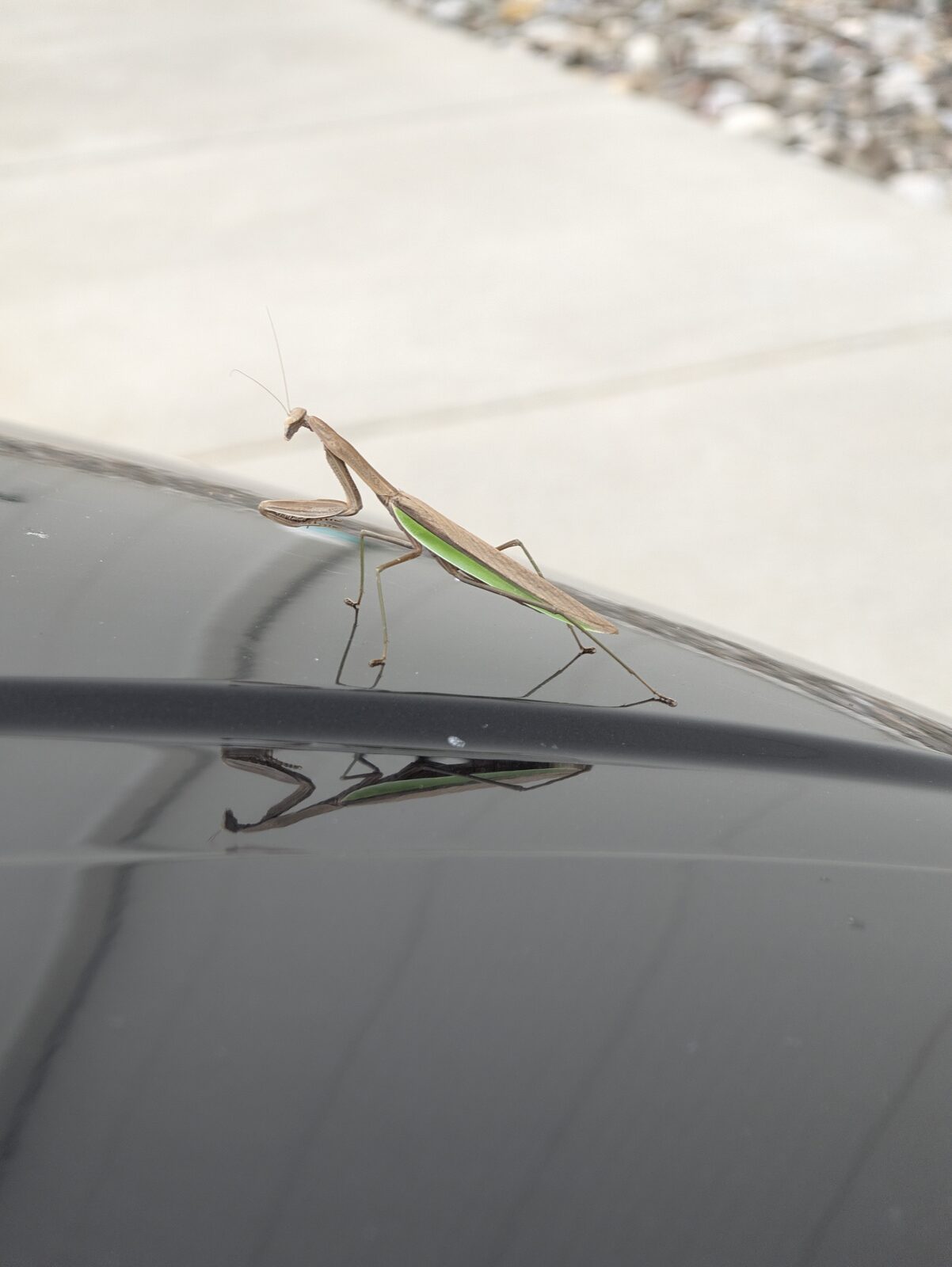
A praying mantis was sitting on the hood of a car at work. I shot it on the 5x telephoto, 105mm equivalent, f/2.84, from a little under a meter away.
Every reviewer this year landed on the same conclusion. The main and ultrawide sensors are basically unchanged from last generation, and the telephoto is the only camera Google meaningfully improved. PetaPixel called out better low light and better detail on the tele specifically (Source). These two frames are why that matters.
The gray car paint is a brutal white balance test, a huge flat field of near neutral with nothing to anchor on, and it reads neutral. The mantis antennae resolve as clean thin lines against a soft gradient. You can see the striations running down its raptorial forelegs. The green stripe along its side holds saturation without bleeding into the tan of the body. The cast shadow goes deep without blocking up.
The second frame is the better photograph. Shot along the edge of the hood so the mantis is mirrored in the paint, blown out concrete and gravel behind it going soft. You can read the green stripe in the reflection. That background compression is the 105mm doing something the main lens simply cannot do at any crop, which is exactly what the rail car frame above demonstrates in the negative.
One more detail worth flagging. GSMArena listed "telephoto can't focus close" as a con of this phone (Source). These were focused at about 0.86 meters on a 105mm lens. Whatever their test found, close focus on the 5x worked fine for me, and it worked on a small moving subject in harsh midday light. If you are buying the Pro XL, you are buying it for that lens.
Video is still where it falls apart
The jitter I have complained about on Pixels for years has not gone away. This year Google effectively admitted it by shipping a mode to fight it. The new Active Stabilization mode caps out at 1080p and 30fps, and PetaPixel found image quality drops noticeably the moment you turn it on. Video Boost quietly knocks 4K60 down to 30fps. GSMArena listed telephoto video stabilization as a con outright.
So the fix for the jitter costs you resolution and frame rate. That is not a fix. That is a trade, and it is not a good one.
The Pixel Watch 5 is the good news
I wore the 45mm Wi-Fi model alongside the phone the whole time, and it is the part of this setup I have almost no complaints about. Worth naming the Wi-Fi version specifically, since the LTE model costs more and does not last as long between charges.
Software is a 10 out of 10. Battery life is great. And the charging is one of the best I have used on any smartwatch, 50 percent in 15 minutes, 80 percent in 30, and a full 465mAh in an hour. For comparison, the Galaxy Watch Ultra 2 took about 94 minutes to fully charge in testing, and that was with a 45W brick. On Samsung's own 25W adapter, PhoneArena measured over four hours. Four hours, for a watch.
Haptics are a 9 out of 10 and very close to my Apple Watch Ultra 3. If you have never paid attention to why Apple's feel different, here it is. The Taptic Engine is a linear actuator, basically a weighted mass on a spring driven side to side by a coil. Because the mass moves along one controlled axis and can be stopped hard, you get a tap with a sharp attack and almost no ring out. It feels like a fingertip knocking on your wrist bone rather than a buzz. A cheap rotating motor has to spin up and spin down, which smears the edges of the pulse into a hum. Google is genuinely close now. That is not a small thing to pull off.
The one real problem. I scratched the glass in week one and I still could not tell you how. Turns out that is not bad luck. The Pixel Watch uses Gorilla Glass 5, which is engineered to survive drops, not to resist scratches, and it sits well below the sapphire premium sport watches use. Wrap that in the Pixel Watch's signature domed shape with no raised bezel and the edge of that dome is the first thing to meet a door frame. Android Police's headline says the rest, "I've scratched every Pixel Watch I've owned, and Google still won't fix the problem" (Source).
So should you buy it?
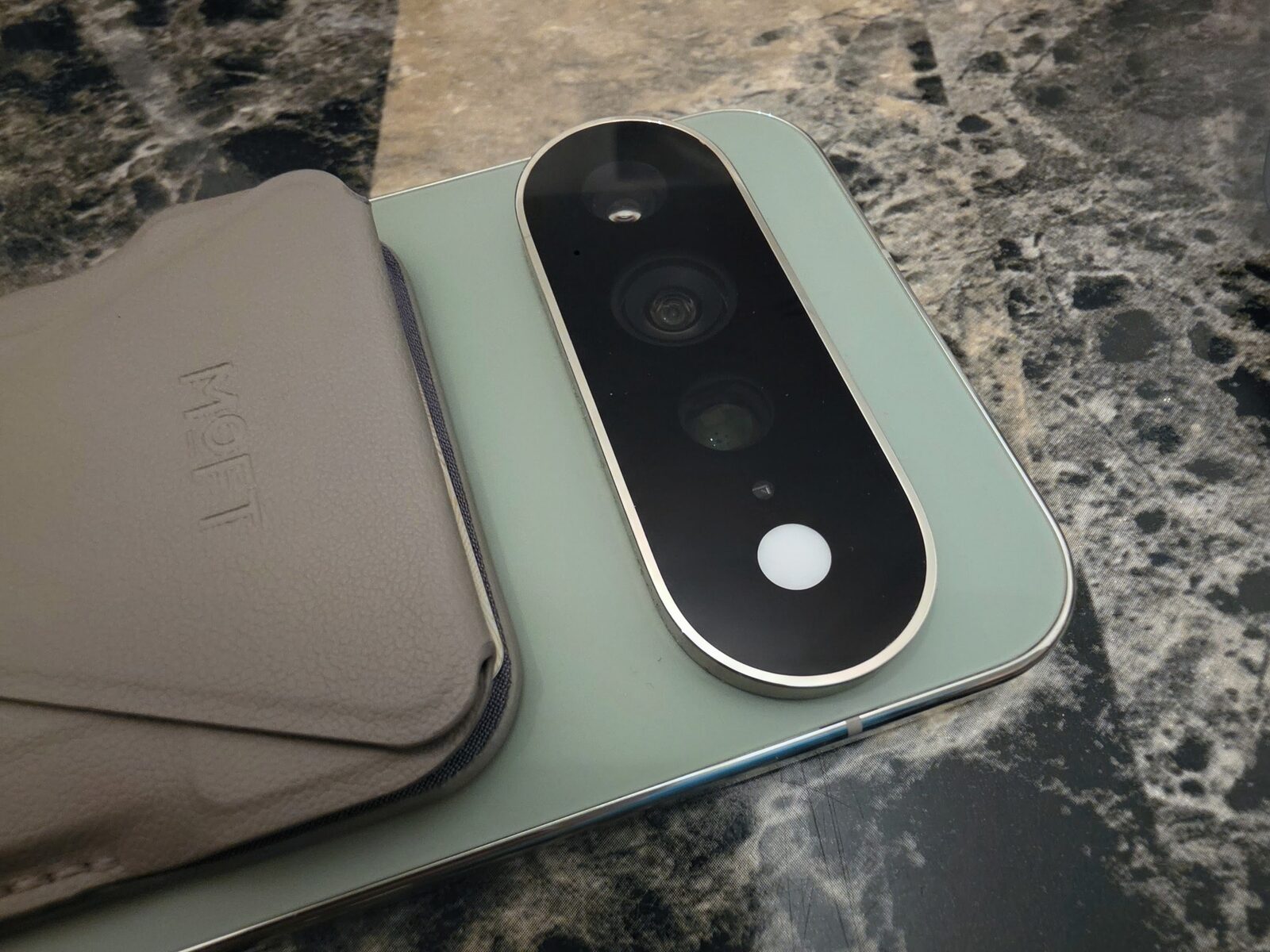
Only at a real discount.
Prices went up and the phone does not earn them. Android Central will not recommend it and their math is hard to argue with. The price climbed over $100 while the RAM dropped, 12GB on the Pro this year against 16GB last year. Smaller battery. Charging slower than advertised. GSMArena called it worth considering and then told readers to check the alternatives first. PhoneArena's comparison headline was that it is mostly the same phone as the 10 Pro XL, only pricier. I am not being harsh. I am agreeing with the consensus.
And that frustrates me, because the gap is narrow. Fix Tensor's thermals. Fix video. Find the bugs before shipping instead of three weeks after. Do that and the clean software, the monthly updates, the feature drops, and the look and feel of this lineup would genuinely pull over iPhone users who are tired of the ecosystem.
The Pixel experience is still the best thing in Android. You just have to be willing to compromise on a lot to live inside it. After two weeks of carrying a backup phone, I am not there yet.
Reviewed on a Pixel 11 Pro XL, 256GB, Olive, on Verizon, alongside a Pixel Watch 5 45mm Wi-Fi. Camera samples shot on the device, unedited, no presets, with the lens and zoom data read straight from each file's EXIF. Product photos of the phone were taken with other cameras. If you want to see what I build when I am not writing about other people's hardware, the lineup is at jcmobileappstudio.com/apps.
Verified September 8, 2026.
Comments
Be kind and stay on topic.
No comments yet. Be the first.